7 Benefits of QR Code Ordering Systems for Malaysian Restaurants
QR code ordering is now standard in Malaysia's F&B scene, but the real difference is how the system behaves under pressure. This article covers 7 benefits for restaurant operators, including two often-overlooked issues that can hurt service fast: OTP-gated ordering flows and POS updates that disrupt operations during peak hours.
 01 Jul 2026

 Eats365

Contents
- The 7 Benefits of QR Code Ordering for Malaysian Restaurants
- 1. Faster Service and Higher Table Turnover
- 2. Contactless, Hygienic Ordering
- 3. Increased Order Accuracy
- 4. Reduced Labour Dependency
- 5. Cost-Effective and Sustainable Menu Management
- 6. No OTP Required for Customers to Order
- Eats365 Scan-to-Order: Built for Malaysian Restaurant Operations
- What to Look for When Choosing a QR Ordering System in Malaysia
- Experience Frictionless QR Ordering with Eats365
The 7 Benefits of QR Code Ordering for Malaysian Restaurants
|
# |
Benefit |
Why It Matters for Malaysian Operators |
|---|---|---|
|
1 |
Faster service & higher table turnover |
More covers per shift, especially on weekends |
|
2 |
Contactless, hygienic ordering |
Ongoing hygiene expectations post-pandemic |
|
3 |
Higher order accuracy |
Fewer remakes, less food waste, better reviews |
|
4 |
Reduced labour dependency |
Addresses Malaysia's persistent service staff shortage |
|
5 |
Cost-effective digital menu management |
Instant updates, no printing costs, sustainable |
|
6 |
No OTP required for customers |
Zero customer drop-off, true frictionless experience |
|
7 |
Selectable POS update scheduling |
Peak hours protected, no forced mid-rush operational sync |
Benefits 1–5 are what every QR ordering vendor in Malaysia will claim. However, #6 and #7 are the differentiators, the ones that determine whether your QR ordering system actually performs in real service conditions or quietly erodes your customer experience and your revenue!
1. Faster Service and Higher Table Turnover
QR code ordering removes the single biggest bottleneck in a restaurant's service cycle: waiting for a staff member to be available to take an order. With self-ordering, the moment a customer sits down, they can begin browsing and ordering — no flag-waving, no "excuse me", no waiting while the waiter finishes at another table.
-
Orders flow from the customer's phone directly to the kitchen
-
Tables are not held idle waiting for service staff availability
-
Faster ordering leads to faster preparation, faster eating, and faster seat release
-
During peak hours, this compounds: even shaving 3–5 minutes per table cycle translates directly into additional covers per shift
For high-volume Malaysian restaurants — particularly QSRs, hawker-style concepts, and busy weekend brunch spots — this compression of the service cycle is where QR ordering pays for itself fastest.
"During the peak hours, customers can place their orders very easily using a QR code. The interface is smooth and user-friendly for both customers and our staffs. It really improved our workflow and operations like no other else did!" - Tang Mansion, Johor
2. Contactless, Hygienic Ordering
The post-pandemic dining environment has permanently shifted Malaysian consumer hygiene expectations. Shared physical menus — handled by dozens of customers per day — are a friction point for hygiene-conscious diners. QR code menus eliminate this entirely.
-
No shared physical menu required
-
Customers browse entirely on their own device
-
Reduces unnecessary staff-to-table contact during the ordering phase
-
Supports contactless payment integration where available
For restaurants near hospitals, in family-friendly malls, or serving older demographic groups, the hygiene benefit continues to be a genuine customer-facing value proposition.
3. Increased Order Accuracy
Miscommunication between diner and server is one of the most common sources of customer complaints and food waste in Malaysian restaurants. With QR ordering, the customer inputs their own order — modifiers, notes, item quantities — directly.
-
Eliminates "sorry, the kitchen made it wrong" scenarios caused by verbal miscommunication
-
Customers can review their order before confirming
-
Customisation requests (no onions, extra spicy, less rice) are captured exactly as entered
-
Orders are transmitted verbatim to the kitchen, reducing re-firing of dishes
"Before Eats365, there was always room for human error when taking orders manually. Now, with Scan-to-Order, the customers put the orders in exactly how they want them. The tickets go straight to the kitchen, the orders are more accurate, and our table turnover is much faster." - 1More Pizza, Malaysia
4. Reduced Labour Dependency
Malaysia's F&B industry faces a persistent shortage of service staff, and labour costs continue to rise. QR ordering doesn't replace your team — but it fundamentally changes what your team needs to do.
-
Servers no longer need to station themselves at tables waiting to take orders
-
Staff can be redeployed to food running, customer relationship management, and resolving issues
-
Fewer staff are needed to handle the same number of covers
-
Part-time staff can be onboarded more quickly since order-taking complexity is reduced
"For us, technology is the backbone of the business, especially when managing multiple branches. Eats365 has really leveled up our efficiency across the board. One of the biggest wins is how user-friendly the interface is. We hire a lot of part-timers, and we don't have hours to spend on training — with this system, they're up and running almost instantly." - Jew Kit Hainanese Chicken Rice, Malaysia
5. Cost-Effective and Sustainable Menu Management
Printed menus are expensive, slow to update, and environmentally wasteful. A digital QR menu solves all three problems simultaneously.
-
Menu changes (price adjustments, item additions, 86'd dishes) are made instantly from a central portal
-
No print runs, no laminating, no waste from outdated menus
-
Seasonal promotions, time-limited offers, and holiday pricing can be scheduled in advance and activated automatically
-
Reduces paper consumption and positions the restaurant as environmentally conscious — increasingly important to Malaysia's urban, millennial dining market
The Eats365 Merchant Portal allows operators to push menu changes across all tables and all locations simultaneously, making it particularly powerful for multi-outlet brands operating across the Klang Valley or beyond.
6. No OTP Required for Customers to Order
Some QR ordering systems require customers to enter their phone number and verify it with an SMS OTP code before they can even view the menu — and this single design decision quietly destroys the frictionless promise of QR ordering.
What Happens When QR Ordering Requires OTP
Imagine this scenario. It's a busy Friday evening at your restaurant. A table of four sits down. They scan the QR code. Instead of a menu, they see a screen asking for a phone number. One of them enters theirs. They wait for an SMS. The message takes 15 seconds — sometimes 45 seconds on a busy network. They enter the 6-digit code. Only then does the menu appear.
That's the best-case scenario. Here's what actually happens across Malaysian restaurant tables:
-
Customers don't understand why they need to give a phone number just to see a menu — and many are reluctant to do so given personal data privacy concerns
-
The SMS doesn't arrive immediately, especially in areas with congested mobile networks (common in busy Malaysian malls and commercial areas)
-
One person in the group has to "own" the ordering session, which becomes awkward when the group wants to browse independently
-
Elderly diners or those less comfortable with tech — a significant proportion of Malaysian family dining groups — become frustrated and call for a server anyway, defeating the entire point
-
Customers simply abandon the flow and wait for a waiter, which reintroduces the exact service bottleneck QR ordering was meant to eliminate
This frustration is not hypothetical. In one widely shared discussion in the Malaysian Facebook community NextUpAsia, one diner described a QR ordering flow that required phone login and OTP, then repeatedly stalled again at payment selection and bank selection.
Why do some systems require OTP in the first place? For these platforms, the OTP serves as a customer data capture mechanism — they want to collect phone numbers to build customer profiles, run remarketing campaigns, or sell the data value proposition to restaurant owners. The cost of that data collection is paid entirely by your customers' patience.
Read more: Configure Scan to Order settings (Full Service) - Eats365 (eats365pos.com)
How Eats365 Scan-to-Order Handles This
Eats365's Scan-to-Order module requires zero OTP, zero phone number, zero login from the customer. The workflow is:
| Step | Eats365 Scan-to-Order | OTP-Required Systems |
|---|---|---|
| 1 | Customer scans QR code | Customer scans QR code |
| 2 | Menu opens immediately | Phone number entry screen appears |
| 3 | Customer browses and orders | Customer waits for SMS OTP |
| 4 | Order fires to kitchen | Customer enters code, then sees menu |
| Time to first menu view | ~2 seconds | 30–90+ seconds |
| Drop-off risk | Minimal | High |
With Eats365, the scan IS the session. There's no identity gate, no data capture friction, and no reason for a customer to give up and wait for a waiter. The menu appears the moment the code is scanned — on any smartphone, on any browser, with no app to download.
This matters especially in the Malaysian market, where QR ordering has already faced a credibility problem with some diners who have had bad experiences with clunky implementations. Eats365's frictionless approach is what QR ordering was always supposed to feel like.
"Eats365's QR Code Scan-to-Order system features a smooth and intuitive interface that empowers customers to place their own orders effortlessly. This capability is incredibly beneficial during peak hours as it allows diners to navigate the menu and order instantly without waiting for service staff assistance." - Tang Mansion, Johor
Eats365 gives restaurants control over when to apply POS updates. For operational changes made in the Merchant Portal — such as menu, pricing, and order-routing updates — staff can trigger the sync manually, device by device, instead of having changes pushed automatically at the worst possible time.
Why Manual Updates Matter in Service Hours
Picture a busy lunch or weekend rush. Tables are filling up, orders are moving fast, and the kitchen is already working at full speed. The last thing any restaurant needs is a system update interrupting the flow in the middle of service.
With manual update control, the restaurant can decide when each device updates, so non-urgent changes can wait until after service, between meal periods, or during planned downtime.
-
The front counter stays focused on guests instead of pausing for an untimely update.
-
The kitchen avoids disruption from changes landing while tickets are still coming in.
-
Managers can update device by device based on actual store timing, not a fixed vendor schedule.
-
Menu, pricing, and routing changes can be synced only when the team is ready.
The result is simple: updates happen on the restaurant’s terms, not in the middle of the busiest part of the shift.
How Eats365 Handles Update Control
The Eats365 POS update flow lets outlet staff manually apply updates within the POS app. This gives restaurants the flexibility to update one device at a time, instead of forcing every terminal to change all at once.
| Update Control Feature | Eats365 | Typical Auto-Update Cloud POS |
|---|---|---|
| Manual update trigger from each device | ✅ Yes | ❌ Often automatic or vendor-timed |
| Device-by-device update control | ✅ Yes | ❌ Usually pushed across devices together |
| Updates can be scheduled around peak service hours | ✅ Yes | ❌ May land during busy periods |
| Operational changes stay under restaurant control | ✅ Yes | ❌ Limited control for the operator |
| iOS or App Store updates on the iPad are handled separately | ✅ Yes — via iOS settings or MDM policies | ✅ Yes — also managed separately by device settings |
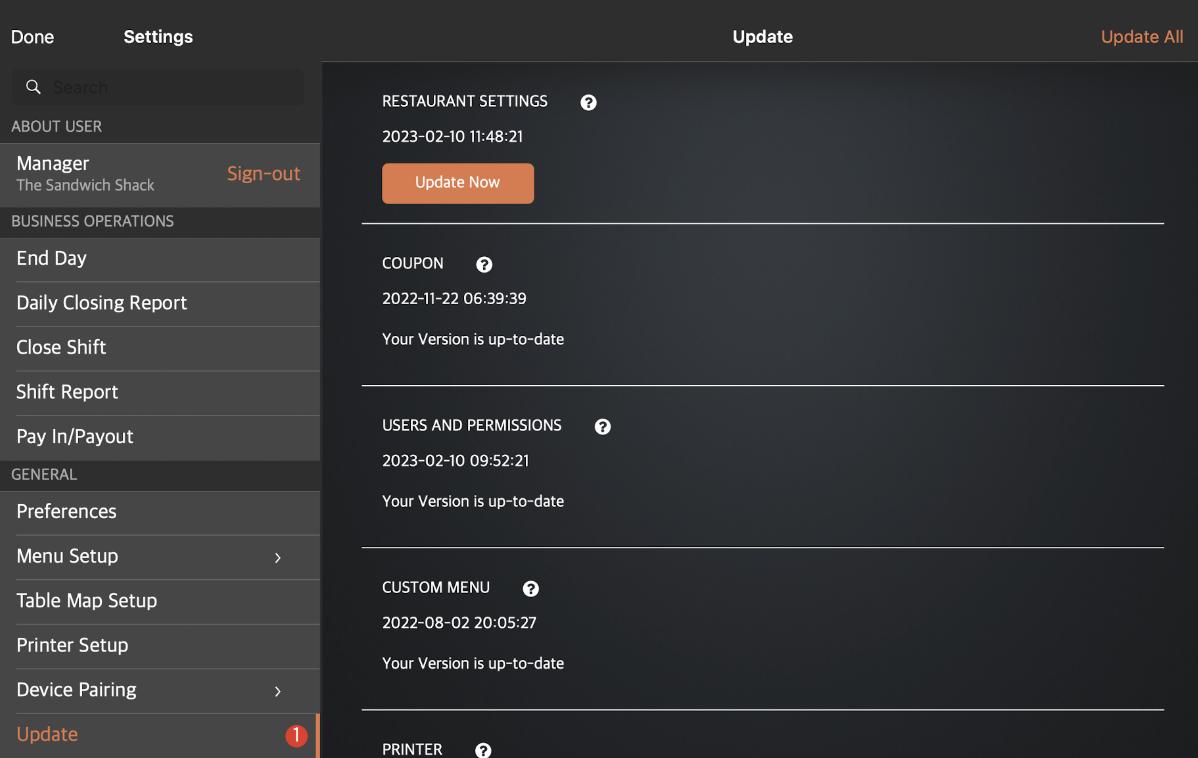
This approach reflects Eats365’s product philosophy: the restaurant decides when updates happen. For busy operations, that means fewer interruptions, less risk during rush hours, and more control over everyday service.
"As a multi-store brand, Eats365 stood out for us because of its robust features compared to other POS systems in the market. It's easier for us to track each branch's performance, and since it's an iOS cloud-based system, we feel confident that it's always updated with minimal bugs — unlike the Windows-based POS systems we've used before." - FowlBoys, Malaysia
Read more: Update the Eats365 POS - Eats365
Eats365 Scan-to-Order: Built for Malaysian Restaurant Operations
Eats365's QR ordering module goes beyond scan-and-order basics. Key operational capabilities include:
-
No OTP / No Login so the menu opens immediately after scan
-
Selectable Update Scheduling for Merchant Portal sync changes to help protect peak hours
-
Order First, Scan Later for customers waiting in queue before seating
-
AYCE / Tiered Menu Mode for all-you-can-eat plans and premium upsell structures
-
Dynamic Menu & Auto-Switching for lunch, dinner, and promo menus by time of day
-
Order Flow Controls such as item limits, wait intervals, and cut-off rules to protect kitchen capacity
-
Direct POS Integration so orders route straight to the Eats365 POS and kitchen output devices
-
Real-Time Analytics via Merchant Portal for sales visibility, item performance, and peak-hour tracking
For multi-location operators, all of these features are manageable from a single Eats365 Merchant Portal, meaning menu changes, promotional pricing, and operational rules can be pushed to every outlet simultaneously.
"Implementing the BYOD (Scan-to-Order) system was a crucial improvement in streamlining Snowy Fox's operations. The restaurant operates in a large outdoor venue, which made manual order-taking overwhelming for the staff. With Eats365's BYOD system, the kitchen receives orders directly from customers, making the entire process much faster and more accurate." - Snowy Fox District Six, Johor
What to Look for When Choosing a QR Ordering System in Malaysia
Not all QR ordering systems are equal. When evaluating options for your Malaysian restaurant, here are the specific questions to ask any vendor — beyond the standard feature checklist:
On customer friction:
-
Does the customer need to enter a phone number or email before accessing the menu?
-
Is there an OTP or verification step in the ordering flow?
-
Does it require an app download?
-
How many taps does it take from scan to menu visible?
On POS update management:
-
For Merchant Portal changes, can the restaurant decide when menu, pricing, and routing updates are synced to the POS?
-
Can those operational syncs be applied outside of peak service hours?
-
What happens to in-progress orders during a sync or refresh?
-
How are device-level iOS and App Store updates managed — manually, via device settings, or through MDM?
On POS integration depth:
-
Does QR ordering integrate natively with the POS, or does it connect via a third-party middleware?
-
Do orders route directly to kitchen display systems or printers?
-
Is there a single Merchant Portal for managing menus, pricing, and ordering rules across all outlets?
On reliability during peak periods:
-
Does the system have offline mode capability if internet connectivity drops?
-
What is the average system uptime track record?
Any vendor that cannot give clear, direct answers to the OTP and update scheduling questions is telling you something important about their priorities — and whose convenience they have designed for.
Experience Frictionless QR Ordering with Eats365
Eats365 is one of Asia's leading restaurant POS providers, serving thousands of restaurants across more than 27 countries, with deep roots in the Malaysian market. The Eats365 Scan-to-Order module is purpose-built for real restaurant operations: no OTP, no customer login, no app download required — and outlet-level control over when Merchant Portal changes are synced to the POS.
If you're evaluating QR ordering systems for your Malaysian restaurant and want to see the no-OTP ordering flow and selectable update scheduling in action, book a free Eats365 POS system demo today. Experience exactly what frictionless QR ordering looks like — for your customers and for your operations.